The Kodak Dock Plus Photo Printer is built for simple, reliable 4×6 photo printing at home.
If you want easy phone-to-print convenience without fiddly setup, this Kodak Dock Plus Photo Printer review will help you decide fast.
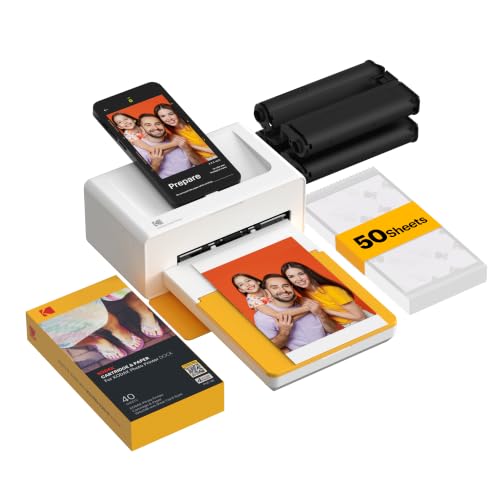
Kodak Dock Plus Review Summary
If you want a no-stress way to print phone photos at home, the Kodak Dock Plus Photo Printer makes a very strong case.
It is especially appealing for families, scrapbookers, and casual photographers who want borderless 4×6 prints, a stable docked workflow, and durable output that is easy to handle right away.
The big advantage here is convenience: place a compatible phone on the dock, connect over Bluetooth, edit in the app, and print.
That combination removes a lot of the friction that usually keeps people from printing their favorite pictures, which is exactly why this model stands out in the home photo printer category.
Best fit: buyers who want simple home photo printing for albums, frames, and everyday memories.
Biggest trade-off: it is not a travel printer and it is not meant for large-format printing or high-volume jobs.
Scorecard
| Category | Score | Why it matters |
|---|---|---|
| Print quality | 8.0 | 4PASS dye sublimation adds smooth detail and a protective lamination layer for water, fingerprint, and fade resistance. |
| Ease of use | 9.0 | Simple Bluetooth pairing and docked phone setup keep the workflow beginner-friendly. |
| Phone docking and charging | 8.0 | The integrated dock stabilizes the phone and charges it while printing. |
| Wireless compatibility | 8.0 | Works with compatible iOS and Android devices through the Kodak app. |
| Photo-editing workflow | 7.0 | The app supports editing, cropping, and customization before printing. |
| Home printing convenience | 8.0 | Well suited to albums, framing, and family photo output from a desktop setup. |
| Portability | 5.0 | Better as a stationary home printer than a travel-friendly device. |
Overall verdict: the Kodak Dock Plus Photo Printer is a smart buy for anyone who values easy 4×6 printing, good durability, and a stable docked workflow more than portability or speed.
Key Features and Specifications of Kodak Dock Plus
The Kodak Dock Plus Photo Printer focuses on one job: making smartphone photo printing feel easy and dependable.
Instead of packing in every possible feature, it concentrates on the essentials that matter most for home photo output.
| Specification | Details |
|---|---|
| Brand | KODAK |
| Model | Dock Plus |
| Printing technology | 4PASS Dye Sublimation |
| Print size | 4×6 inches |
| Print output | Color |
| Connectivity | Bluetooth, Wireless |
| Compatible devices | iOS and Android smartphones |
| Special features | Borderless Printing, Docking |
| Print time | Approximately 55 seconds per photo |
| Weight | 1366 grams |
| Power | Requires power outlet for desktop use |
| Color | Yellow |
- 4PASS dye sublimation prints each photo in three color layers plus a clear protective lamination layer.
- Borderless 4×6 output is ideal for albums and frames.
- Built-in phone dock keeps the device stable during printing.
- Phone charging while printing is a helpful convenience feature.
- KODAK Photo Printer app supports editing, cropping, and customization.
- Designed for home desktop use rather than grab-and-go portability.
- Durable prints are made to resist fingerprints, water, and fading.
From a buyer’s perspective, the most important specs are not just the 4×6 size and Bluetooth support.
The real value is that the printer is purpose-built for casual home photo workflows, where ease and print durability matter more than industrial speed or office-style versatility.
Pros and Cons of Kodak Dock Plus
Here is the practical Kodak Dock Plus Photo Printer pros and cons breakdown buyers should know before deciding.
Pros
- Very simple to use, even for first-time photo printer owners.
- Docked phone setup feels stable and less awkward than printing from a phone floating around on a desk.
- 4PASS prints look polished with a smooth finish and protective coating.
- Good for framing and albums thanks to the borderless 4×6 format.
- App editing tools give casual users enough control to crop and customize photos.
- Phone charging during printing is a small but useful convenience.
Cons
- Limited to 4×6 prints, so it is not ideal if you want larger sizes.
- Not especially portable because it needs a power outlet and is built as a desktop station.
- Print speed is moderate, so it suits casual use more than bulk jobs.
- Depends on the Kodak app and compatible phones, which adds a layer of device dependence.
The strengths clearly center on user experience and print durability, while the main compromises are format limitation and portability.
That is a fair trade if your needs are focused on home photo printing.
Who Should Buy Kodak Dock Plus?
The Kodak Dock Plus Photo Printer is a strong choice for buyers who want easy home printing without a complicated setup.
It is especially well suited to people who already take most of their pictures on a smartphone and want a fast way to turn those images into physical keepsakes.
- Families who print vacation photos, school memories, and everyday moments.
- Scrapbookers and crafters who want consistent 4×6 prints.
- Casual photographers who prefer simple home output over professional lab ordering.
- Buyers who like docked convenience and want the phone to stay stable while printing.
- People who value durable prints that resist fingerprints and moisture.
You should probably skip it if you want a portable printer for trips, need larger photo sizes, or expect to print a high volume of images quickly.
It is also not the best match if you want a general-purpose printer for documents and labels.
How the Docking Station Changes the Experience
The dock is the feature that gives the Kodak Dock Plus Photo Printer its identity.
Without it, this would simply be another 4×6 wireless printer.
With it, the printing process feels more guided and less fragile because the phone has a physical place to sit during the job.
That matters more than it might sound.
Many smartphone photo printers rely entirely on wireless pairing and app control, which can feel a little detached.
The docked setup makes the printer feel like a small home photo station, and that is a better fit for people who print at a desk, in a craft room, or in a family space.
The added charging function is another practical win.
If you are sorting photos, editing them, and printing several in a row, the phone staying powered is a nice quality-of-life benefit.
This is one of the main reasons the Kodak Dock Plus feels more polished than basic wireless-only alternatives.
4PASS Print Quality and Photo Longevity
The Kodak Dock Plus uses 4PASS dye sublimation, which is one of the more buyer-friendly printing technologies in this category.
Rather than relying on a standard inkjet-style output, it prints in layered passes and adds a clear protective finish.
That helps produce photos with a smoother look and more resistant surface.
For most buyers, the important question is not whether it can match a professional lab in every scenario, but whether it makes home prints look clean, vibrant, and durable.
On that point, it performs well.
Skin tones, family snapshots, and everyday color photos should look satisfying for albums or framing, especially when sourced from a good-quality phone image.
The protective layer is a meaningful advantage because it helps guard against fingerprints, water, and fading.
That makes the printer especially appealing for households where prints get handled often or displayed without much protection.
If you want photos you can pass around at gatherings or stick into a scrapbook, this durability matters.
The main downside is that this technology is focused on a single use case.
If your priority is larger prints, ultra-fast output, or a multi-purpose office workflow, a different printer type will make more sense.
Kodak App Features and Mobile Workflow
The companion app is central to the Kodak Dock Plus Photo Printer review experience.
You are not buying a printer with a clunky, old-school workflow; you are buying a phone-first printing system that expects you to live inside the app for setup, editing, and output.
The app supports common prep tasks like cropping and basic customization, which is exactly what most casual users need.
It is convenient to fine-tune a photo on the same device where it was taken, then send it to print with minimal friction.
That said, the app-based workflow also defines the product’s limits.
If you want professional editing controls, advanced color management, or a more versatile print pipeline, you may find the software too simple.
For everyday users, though, simplicity is the point.
Kodak has intentionally optimized for speed of use, not complexity.
Bluetooth connectivity also keeps things approachable.
You do not need to build a complicated home network setup just to print a family photo.
For many buyers, that ease is the difference between a printer they use often and one that sits unused.
Best Uses for Home Photo Printing
The Kodak Dock Plus works best when it is used exactly as intended: a compact home photo printer for 4×6 prints.
If you keep expectations aligned with that mission, it can be a very satisfying purchase.
- Photo albums for vacations, birthdays, and holidays.
- Framing prints for desks, shelves, and wall displays.
- Scrapbooking and DIY memory projects.
- Family event prints for sharing physical copies quickly.
- Everyday personal printing when you want your phone photos off the screen.
What it is not built for is equally important.
It is not a bulk printer, it is not a large-format solution, and it is not a portable social gadget in the same way an Instax-style printer is.
The Kodak Dock Plus is more of a dedicated home photo station.
What to Know About Paper, Speed, and Setup
For buyers comparing home photo printers, the practical details matter.
The Kodak Dock Plus prints a photo in about 55 seconds, which is respectable for casual home use but not particularly fast if you want to churn through a large stack of pictures.
Because it is designed around 4×6 output, you should think about paper and format from the start.
That keeps things simple, but it also means you are committing to a narrower output style.
If your main goal is printing social media images, family memories, and standard snapshots, that commitment is reasonable.
If you want creative flexibility, it may feel restrictive.
Setup should be relatively straightforward for most users.
The printer is built for desktop placement, requires power, and is not meant to be tossed in a bag.
In practice, that makes it better for a permanent spot in a home office, den, or craft area.
Buyers who want a dependable station will appreciate this design choice.
Compared with instant printers and smaller portable photo devices, the Dock Plus trades mobility for a more grounded, consistent experience.
Compared with larger photo printers, it sacrifices format versatility for simplicity.
Those are sensible trade-offs if your main use is 4×6 home printing.
Alternatives to Consider
If you are still deciding whether the Kodak Dock Plus Photo Printer is the right fit, a few common alternatives are worth comparing.
- Fujifilm Instax Photo Printer options are better if you want a more playful, portable, instant-print style.
- Canon Selphy photo printers are a strong alternative if you want another compact dye-sublimation home printer with a good reputation.
- Wireless portable photo printer models make more sense if mobility matters more than docking convenience.
Among those choices, the Kodak Dock Plus stands out for buyers who specifically want the physical dock and charging experience.
That single design decision gives it a clearer home-use identity than many competitors.
Is Kodak Dock Plus Worth It?
So, is Kodak Dock Plus Photo Printer worth it?
For the right buyer, yes.
It is a worthwhile purchase if you want an easy, dependable way to print 4×6 photos from your phone and you value durable output over portability or advanced features.
The strongest reasons to buy are the simple docked workflow, Bluetooth convenience, protective 4PASS prints, and family-friendly home use.
Those benefits combine into a product that feels practical instead of gimmicky.
You are getting a focused tool that does its core job well.
The reasons to hesitate are just as clear.
It is limited to 4×6 output, it needs a power outlet, and it is not meant for high-speed or travel use.
If you need a broader-purpose printer, there are better options elsewhere.
Final recommendation: buy the Kodak Dock Plus Photo Printer if you want a straightforward home photo station for albums, framing, and everyday memories.
Skip it if you need portability, large-format printing, or heavy-duty output.
For the intended buyer, it is a smart and satisfying choice.