The NIIMBOT B1 Label Maker review starts with a simple takeaway: this is a compact, app-driven label printer built for people who want fast organization without fuss.
It is especially appealing if you want a portable, low-maintenance way to label bins, wires, bottles, inventory, and office supplies.
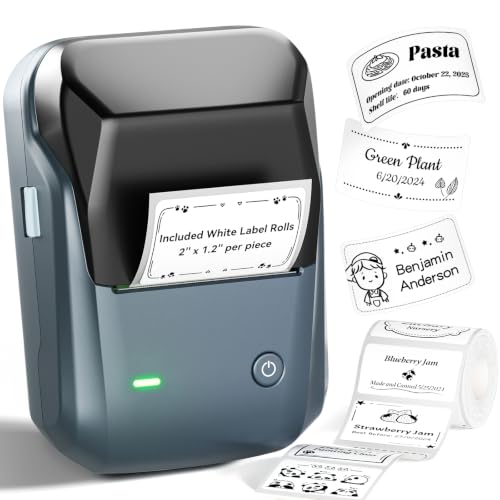
NIIMBOT B1 Review Summary
If you want a practical label maker that favors convenience over complexity, the NIIMBOT B1 Label Maker makes a strong case for itself.
It is best for homeowners, teachers, office users, and small business sellers who want a lightweight thermal printer that works from a phone or laptop and produces clear, monochrome labels with minimal setup.
The biggest reasons to buy the NIIMBOT B1 Label Maker are its inkless printing, compact size, app-based controls, and surprisingly flexible formatting options for a device in this category.
It is not a full desktop label system and it is not designed for color labels, but for everyday tagging and storage organization it lands in a very useful sweet spot.
Scorecard
| Category | Score | Why it matters |
|---|---|---|
| Labeling convenience | 9.0 | Bluetooth pairing, app control, and auto label-size detection make quick label creation straightforward. |
| Print quality | 8.0 | Thermal monochrome output at 203 dpi is clear and readable for bins, wires, and small text. |
| Portability | 9.0 | Compact build and rechargeable battery make it easy to move between rooms or work areas. |
| Customization options | 8.0 | Fonts, borders, symbols, and saved templates offer solid flexibility. |
| Compatibility | 7.0 | Supports iOS, Android, smartphones, laptops, and USB on PC, but not tablets. |
| Value for organization tasks | 8.0 | Inkless thermal printing and included rolls make it a strong fit for home, office, school, and small business use. |
Bottom line: the NIIMBOT B1 is a good buy for shoppers who want a portable Bluetooth label printer that is easy to use, quick to set up, and well suited to everyday organization.
If you need color output, tablet support, or heavy-duty commercial volume, you should look at a larger alternative.
Key Features and Specifications of NIIMBOT B1
The NIIMBOT B1 Label Maker focuses on the essentials: simple connection, fast label creation, and low-maintenance thermal printing.
The design choices make sense for a buyer who wants a label printer that is easy to carry and easy to use.
| Specification | Details |
|---|---|
| Brand | NIIMBOT |
| Model | B1 Label Maker |
| Printer type | Thermal |
| Printing technology | Thermal, inkless |
| Output | Monochrome |
| Connectivity | Bluetooth |
| Compatible devices | Laptops, smartphones |
| Controller support | Android, iOS |
| Control method | App |
| PC connection | USB cable with driver download from the official website |
| Resolution | 203 dpi |
| Weight | 0.5 pounds |
| Dimensions | 1 in x 1 in x 1 in |
| Media | Labels |
| Battery/charging | Rechargeable battery with auto-shutoff after 15 minutes of inactivity |
| Included media | White label rolls included |
| Build material | ABS housing |
| Additional functions | Print only |
| Warranty | Limited |
Feature-wise, the standout is the auto-detect label size function, which reduces manual setup and helps speed up repetitive jobs.
The app also adds 30+ fonts, 100+ borders, 1,500+ symbols, multilingual support, and template saving, which is more customization than many buyers expect from a compact label maker.
The included white label rolls are a useful starter touch because they let you begin printing sooner instead of hunting for compatible media immediately.
For a busy household, that convenience matters.
Pros and Cons of NIIMBOT B1
Like any specialized tool, the NIIMBOT B1 Label Maker pros and cons are easy to define once you know what it is built to do.
| Pros | Cons |
|---|---|
| Very easy Bluetooth setup for phone-based printing | Not compatible with tablets |
| Inkless printing keeps upkeep low | Monochrome output only |
| Compact and lightweight for portable use | Best suited for labels rather than broader printing tasks |
| Strong app customization with fonts, borders, symbols, and templates | PC setup may require driver installation |
| Good fit for many organization and tagging tasks | Small portable design is not ideal for heavy-duty industrial use |
| Includes label rolls to get started quickly | Warranty is limited |
Best strength: the B1 is extremely practical for recurring label jobs.
Main drawback: it is not a universal printer and does not try to be one.
Who Should Buy NIIMBOT B1?
The NIIMBOT B1 Label Maker is a smart choice for buyers who want a simple home or office label printer with minimal learning curve.
It is especially well suited to people who prefer phone app control instead of a button-heavy standalone machine.
- Home organizers labeling pantry bins, drawers, storage boxes, and cords
- Office users who need fast file, shelf, cable, and supply labeling
- Small business owners labeling inventory, tags, shipping prep items, and product sleeves
- Teachers and classroom staff organizing materials, folders, and classroom supplies
- Anyone who wants inkless, low-maintenance printing without dealing with cartridges or ribbons
It is also a strong fit for practical labeling jobs like jewelry tags, medicine bottles, expiration dates, tool labels, and wire marking.
Those are exactly the kinds of everyday tasks where a portable thermal printer delivers real value.
Who should skip it? Buyers who need tablet support, color printing, or high-volume warehouse-grade output should consider a more robust label system instead.
How the NIIMBOT App Works
The app is one of the biggest reasons the NIIMBOT B1 feels easy to live with.
Once paired over Bluetooth, the phone becomes the command center for text entry, layout selection, symbol insertion, and template reuse.
From a usability standpoint, that means you can create labels faster than you would on many old-school handheld label makers.
Instead of cycling through tiny buttons and scrolling menus, you type directly on your phone, pick a format, and print.
That is a major convenience advantage for users who value speed.
The app also helps the NIIMBOT B1 Label Maker stand out for customization.
With multi-font support, borders, multilingual options, and a large symbol library, it can handle plain utility labels and more polished presentation labels for small shops or organized home systems.
Practical note: the app-based workflow is great for most buyers, but it does mean your satisfaction depends on your comfort with mobile apps.
If you want a purely standalone printer with no phone dependency, this is not the best fit.
Label Quality and Tape Compatibility
The B1 uses 203 dpi thermal printing, which is a sensible resolution for its category.
In real-world use, that should be clear enough for addresses, inventory codes, shelf tags, container labels, and short text that needs to stay readable at a glance.
Because output is monochrome, the device is best thought of as a utility label printer rather than a design printer.
That is not necessarily a flaw; in fact, it keeps the workflow simple.
For many organization tasks, high contrast black-on-white labels are exactly what you want.
The included white rolls are a plus for buyers who want a professional, clean look right out of the box.
Still, it is important to verify label width and compatibility if you plan to use the printer for a very specific application, such as jewelry tags or small cable markers.
Design choice to note: the B1 prioritizes portability and convenience over advanced media flexibility.
That is a good trade for many shoppers, but not for everyone.
Setup, Pairing, and Troubleshooting Tips
Setup is generally straightforward, especially if you use the NIIMBOT app on a compatible iPhone or Android device.
The Bluetooth connection and auto size detection reduce the friction that often makes label makers annoying to use.
For PC use, the process is still manageable, but it is a little more involved because you may need to download the correct driver from NIIMBOT’s official website and connect by USB.
That is normal for a compact printer in this category, but it is worth knowing before you buy.
- Charge the device before first use so you start with a full battery.
- Confirm your device compatibility, especially if you planned to use a tablet.
- Download the official app and driver to avoid setup issues.
- Save templates if you print the same labels repeatedly, such as bins or product tags.
- Keep the printer within easy Bluetooth range for the smoothest pairing experience.
The auto-shutoff after 15 minutes is a thoughtful battery-saving choice.
It helps preserve charge between short labeling sessions, which is exactly how many people use this kind of device.
Best Use Cases for Home and Business
This is where the NIIMBOT B1 Label Maker earns its keep.
Its compact size and quick app workflow make it especially useful for high-frequency, low-complexity labeling tasks.
- Home organization: pantry bins, spice jars, craft drawers, storage boxes, and closet systems
- Office organization: file tabs, shelf markers, supply bins, and cord management
- Small retail use: price tags, product tags, stock labels, and display organization
- Workshop use: tool labels, wire tags, parts containers, and project bins
- Health and household use: medicine bottles, expiration reminders, and household items
If your labeling needs are repeatable and practical, the B1 is a strong match.
If you mostly need decorative stickers, photo labels, or full-color branding, you should look elsewhere.
Inkless Printing and Ongoing Cost
One of the biggest selling points of the NIIMBOT B1 Label Maker is that it uses inkless thermal printing.
That means there are no ink cartridges to replace, no toner to manage, and no smudging caused by liquid ink.
For buyers, that has two major benefits: lower upkeep and fewer interruptions.
You can keep the printer around for quick jobs without worrying much about maintenance.
In a home or small business setting, that convenience can matter more than premium print features.
Thermal printers do have tradeoffs, though.
Labels are typically best for indoor or controlled environments, and the output is limited to monochrome.
So while the long-term running cost is attractive, this is still a specialized machine designed for labels rather than general document printing.
Value verdict: if you print labels regularly, the inkless design is one of the strongest reasons to choose the B1.
Alternatives to Consider
If you are comparing the NIIMBOT B1 Label Maker with similar Amazon options, there are a few logical alternatives worth checking.
- NIIMBOT B1 Pro label printer — a sensible step up if you want to stay within the same brand family.
- NIIMBOT B21 label printer — worth considering if you want a different form factor or feature mix.
- NIIMBOT B21 Pro label maker — another NIIMBOT option for shoppers who want comparable smartphone-based labeling.
- Bluetooth thermal label maker — a broader search if you want to compare multiple brands and layouts.
Compared with larger label systems, the B1 emphasizes portability and ease of use.
That is the right trade if you value quick everyday labeling more than advanced hardware features.
NIIMBOT B1 Review Summary
The NIIMBOT B1 Label Maker review comes down to a simple buyer profile: this is for people who want a portable, easy-to-use, inkless label printer that handles everyday organization well.
It excels at quick phone-based labeling, template reuse, and compact storage-friendly design.
Buy it if you want a convenient thermal label maker for home, office, classroom, or small business use.
Skip it if you need tablet support, color output, or heavier-duty commercial printing.
Overall, the NIIMBOT B1 is a strong practical buy for mainstream labeling needs and a good example of a product that gets the fundamentals right.
For the right user, it is definitely worth considering.
Is NIIMBOT B1 Worth It?
So, is NIIMBOT B1 Label Maker worth it?
For most buyers who want a compact Bluetooth label printer, the answer is yes.
It offers a thoughtful mix of portability, app convenience, clear thermal printing, and low ongoing maintenance that makes everyday labeling much easier.
The value proposition is strongest if you regularly organize household items, office supplies, retail stock, or small-batch products.
The main limits are easy to understand: monochrome only, no tablet support, and no ambition to replace a full-size printer.
Those are real drawbacks, but they are reasonable tradeoffs for a device designed to be simple and portable.
Final verdict: if you want a dependable, low-fuss label maker and your needs fit the B1’s feature set, the NIIMBOT B1 Label Maker is worth it and deserves a place on your shortlist.