Nelko P21 Label Maker review searches usually come from shoppers who want fast, portable labeling without the mess of ink or toner.
This compact Bluetooth model is built for everyday organization, but compatibility and fixed label lengths matter.
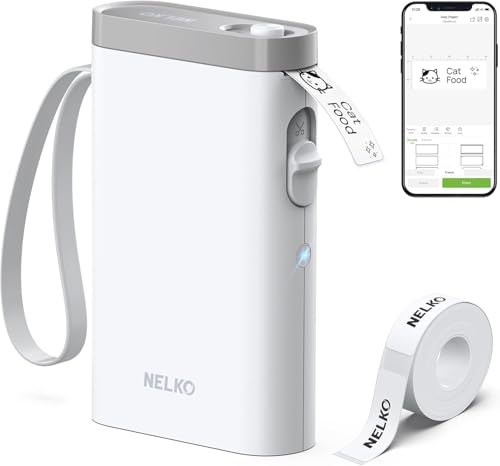
Nelko P21 Review Summary
If you want a small, wireless label maker that lives on your phone, the Nelko P21 makes a strong case.
It is especially appealing for home organizers, teachers, office users, parents, and small sellers who need quick monochrome labels for bins, cables, folders, jars, name tags, and storage boxes.
What stands out most is the mix of portable hardware and a feature-rich app.
The P21 is not trying to be a bulky desktop label system; it is designed for convenience, speed, and simple setup.
That makes it a smart buy for people who value easy label creation more than advanced hardware controls.
Its main tradeoffs are also clear.
You get black-only thermal printing, fixed label lengths, and a compatibility note that shoppers should check carefully before buying.
For the right buyer, though, those limitations are reasonable because the device focuses on the things that matter most in day-to-day labeling: portability, app flexibility, and low-maintenance operation.
Nelko P21 Scorecard
| Category | Score | Why It Matters |
|---|---|---|
| Portability | 9/10 | Very compact and lightweight for on-the-go labeling. |
| Print Quality | 8/10 | 203 DPI direct thermal output delivers clear monochrome labels. |
| App Features | 9/10 | Large template and icon library with QR codes, barcodes, images, and multiple languages. |
| Ease of Use | 8/10 | Phone-based Bluetooth setup is simple, but app dependence matters. |
| Battery and Convenience | 8/10 | Rechargeable battery and wireless use improve everyday practicality. |
| Compatibility | 6/10 | Works with iOS and Android, but Android 14 Google phone limitation is important. |
| Versatility | 8/10 | Useful for home, office, school, and light small-business labeling tasks. |
Bottom line: the Nelko P21 is a strong value-oriented portable label printer for buyers who want simple, inkless, phone-controlled labeling.
If you need color output, broad compatibility, or fully custom label lengths, look elsewhere.
Key Features and Specifications of Nelko P21
The Nelko P21 is a Bluetooth thermal label maker with a compact white body and a built-in rechargeable battery.
It is designed to be carried easily, stored in a drawer, or brought from room to room without feeling like a full-size office machine.
| Specification | Details |
|---|---|
| Brand | Nelko |
| Model | P21 |
| Connectivity | Bluetooth |
| Printing Technology | Direct thermal |
| Output | Monochrome |
| Resolution | 203 DPI |
| Power | Built-in rechargeable battery |
| Item Weight | 11.52 ounces |
| Product Dimensions | 6.65 x 4.5 x 1.9 inches |
| Label Sizes | 14x40mm, 14x50mm, 14x75mm and more |
| App Support | iOS and Android |
| Languages | 29 languages |
| Template Library | 750+ templates, 3600+ icons, 700+ borders, 5500+ materials |
From a buyer’s perspective, the most important design choice is the use of direct thermal printing.
That means no ink cartridges, no toner, and fewer running costs.
In practical use, that makes the P21 easier to maintain than many older handheld label printers, especially for users who only need labels occasionally but still want a dependable tool.
The app is where the P21 tries to separate itself from basic budget label makers.
It supports text, QR codes, barcodes, images, borders, materials, and time-based content.
It also offers 29 language support, which is a useful bonus for multilingual households, classrooms, or workplaces.
For organization-heavy homes and offices, that variety can save time and make the labels look more polished.
Still, there are a few practical notes to keep in mind.
The label length is fixed rather than fully custom, and the manufacturer recommends using Nelko thermal label paper for the best results.
The product also includes an important compatibility warning for Google phones running Android 14, so phone owners should verify support before committing.
Pros and Cons of Nelko P21
Here is the quick Nelko P21 Label Maker pros and cons breakdown buyers should know before ordering.
| Pros | Cons |
|---|---|
| Very small and lightweight for portability | Prints only in monochrome |
| Wireless Bluetooth printing from a phone | Label length is fixed, not fully customizable |
| Inkless thermal printing keeps operation simple | Compatibility note for Google phones on Android 14 |
| Strong app customization with many templates and design elements | Requires the companion app for use |
| Useful for a wide range of organization tasks | Best results depend on compatible Nelko thermal label paper |
| Rechargeable battery improves convenience | Not a fit for buyers who need color labels |
What this means in real life: the pros are heavily centered on convenience and flexibility in the app, while the cons are mostly about hardware limitations.
If your job is to organize, sort, and identify items quickly, the tradeoffs are usually acceptable.
If you want a more traditional label system with broader control over media and output, the limitations may feel restrictive.
How the Nelko P21 App Works
The Nelko app is the heart of this label maker.
Once installed from the App Store or Google Play, it connects over Bluetooth and opens up the design tools that make the P21 feel much more capable than its size suggests.
For many buyers, this app-first design is a benefit.
It allows fast editing from a phone, and that is ideal when you need to make a label in seconds rather than sit at a desktop machine.
The app’s library of templates, icons, borders, and materials helps users create labels that look clean and organized without much design effort.
That said, app dependence is a real decision factor.
If your phone is old, unsupported, or running into compatibility quirks, the whole experience becomes less smooth.
The note about Android 14 on Google phones is especially important, because it can affect buyers who assume all Bluetooth devices will work equally well.
For iPhone users, the app update note matters too.
The good news is that once the setup is complete and the app is updated, the workflow should be straightforward for most common labeling tasks.
For shoppers who want phone-based customization without learning a complicated editor, this setup is one of the P21’s best strengths.
Label Size and Template Options
Label sizing is another place where the Nelko P21 shows both its strengths and limits.
It supports 14x40mm, 14x50mm, and 14x75mm label formats, which are well suited to short organization labels, name tags, and small item identification.
The fixed length approach is practical for most everyday use cases.
You do not need to spend much time choosing paper formats, and the printer is geared toward quick output rather than complicated label engineering.
For buyers labeling pantry jars, school supplies, cables, cosmetics, storage bins, and mailing items, that simplicity is actually helpful.
However, if you need a device for fully custom label sizing or more specialized commercial work, the P21 may feel too constrained.
In that case, a larger desktop label printer or a more advanced handheld model could be a better fit.
The P21 is best when your goal is efficient, repeatable, small-format labeling.
Print Quality and Tape Compatibility
The P21 uses 203 DPI direct thermal printing, which is a solid spec for a compact label maker.
In practical terms, that should produce crisp text and reasonably sharp graphics for a device in this class, especially since the output is monochrome and optimized for simple visibility.
For text-heavy labels, barcodes, QR codes, and icons, the resolution is more than adequate.
It is not trying to compete with a photo printer, but that is not the point.
Its job is to make labels readable, consistent, and easy to scan.
For home and office organization, that is the right priority.
Compatibility with the right label paper matters here.
The product brief recommends using Nelko thermal label paper for the best results, and that is typical of many thermal devices.
Buyers should also handle the label strip carefully and avoid damaging the green sticker backing, since a small input issue can affect feeding and print quality.
Important limitation: the P21 is monochrome only, so if your labeling style depends on colors for categories or visual sorting, this model will not meet that need.
For most users, though, the clean black-on-white look is exactly what they want for practical organization.
Battery Life and Everyday Convenience
Convenience is one of the biggest reasons to choose a portable label printer, and the Nelko P21 performs well in that category.
Its built-in rechargeable battery means you can label anywhere without being tethered to a cable, which is especially useful in classrooms, storage rooms, shared offices, and busy homes.
The device’s 11.52-ounce weight and compact 6.65 x 4.5 x 1.9-inch footprint make it easy to slip into a bag or drawer.
That portability is more than a spec-sheet detail; it changes how often you actually use the printer.
When a label maker is easy to reach, people tend to label more consistently.
There is also a strong everyday-use benefit in the lack of ink or toner.
Thermal printing is one of the cleanest ways to handle frequent label jobs because there are fewer consumables to worry about.
That makes the P21 appealing for buyers who want a low-maintenance organization tool rather than a finicky accessory that needs constant supplies.
Best Uses for Home, Office, and School
The Nelko P21 is versatile enough to fit several buying scenarios, but it is especially good for small, repetitive labeling jobs.
In the home, it works well for food storage, cosmetics, clothes, drawers, craft supplies, and pantry bins.
In an office, it can handle folders, cable tags, mailings, shelf labels, and supply drawers.
In school settings, it is a useful tool for name tags, notebook labels, classroom organization, and student materials.
This is not a heavy-duty warehouse printer, and it is not meant for industrial assets or large volume shipping operations.
Its sweet spot is light to moderate labeling where speed and convenience matter more than maximum formatting control.
If that is your use case, the P21 can become one of those tools you reach for all the time.
For small business owners, it can also support simple sticker-style labeling and item identification, though serious shipping operations may want a more robust desktop model.
The biggest advantage remains the same across all these uses: you can make a label quickly from your phone without dealing with wires, ink, or complicated setup.
Comparable Alternatives to Consider
If you are comparing the Nelko P21 against other popular Amazon label makers, there are a few worthwhile alternatives to research before deciding.
- Phomemo Bluetooth label maker — A common alternative if you want a similar portable, app-based experience with broad popularity.
- Brother P-touch label maker — Better for buyers who prefer a more established label ecosystem and traditional handheld workflow.
- NIIMBOT label printer — Another app-first compact label printer worth comparing for home and office use.
- MUNBYN portable label maker — Useful if you want to compare portable thermal printing options with different app and paper ecosystems.
- DYMO handheld label maker — A familiar choice for buyers who want a more traditional brand approach.
In most comparisons, the Nelko P21’s edge is portability and app depth.
The alternatives may win on brand familiarity, device support, or ecosystem maturity, depending on your priorities.
Who Should Buy Nelko P21?
The Nelko P21 is a good fit for buyers who want fast, compact, inkless label printing from a phone.
It is especially well suited to people who organize household items, manage classroom materials, label office supplies, or need a lightweight machine they can carry around easily.
You should consider it if you value a strong app experience, template variety, and simple maintenance.
The P21 also makes sense for buyers who do not need color labels and are happy with monochrome output for clean, readable identification.
It is less ideal for anyone who wants full device compatibility without caveats, fully custom label sizing, or a more traditional printer workflow.
If you use a Google phone on Android 14, you should verify support before buying.
If you need broad media flexibility or color-coded organization, another product line may be a better match.
Best buyer fit: practical organizers, teachers, parents, students, and office users who want a small, easy label maker with a lot of app-based customization.
Is Nelko P21 Worth It?
So, is Nelko P21 Label Maker worth it? For most buyers who want a compact, low-maintenance label printer, the answer is yes.
It offers a strong mix of portability, app features, and simple thermal printing that makes everyday organization easier.
The value proposition is strongest if you care about convenience over complexity.
You are getting a pocketable Bluetooth label maker with a rechargeable battery, solid 203 DPI output, and a surprisingly deep template library.
That combination makes the P21 feel more versatile than many budget label makers in the same general class.
Still, the decision should be made with the limitations in mind.
The black-only output, fixed label sizes, and the Android 14 compatibility note are all real factors.
If those are acceptable, the P21 can be an excellent everyday organizer.
If they are dealbreakers, it is better to compare it against Brother P-touch, Phomemo, NIIMBOT, or DYMO options first.
Final verdict: the Nelko P21 is worth buying for portable home, office, and school labeling, especially when you want an app-driven printer that is easy to use and simple to carry.
It is not the most flexible label maker on the market, but for the right user it is a very practical one.