A good home-office fan should cool you without competing with meetings, music, or concentration. Tower fans offer a space-saving way to improve airflow while keeping your desk area comfortable.
We compared 10 models across quiet operation, airflow, oscillation, controls, timers, and overall office practicality. The right choice depends on your room size, noise sensitivity, and whether you prefer remote or smart controls.
Best 10 Tower Fans for Home Offices Picks for 2026
Best High-Velocity Pick

- Up to 28 ft/s airflow with 90-degree oscillation
- 25 dB operation with Sleep mode
- Eight speeds, four modes, remote, and touch controls
Best For: Powerful, quiet airflow in a home office
Best Tall Room-Cooling Option
Lasko Wind Curve 42-Inch Tower Fan

- Tall 42-inch design with 60-degree oscillation
- Remote control and 7.5-hour programmable timer
- Nighttime setting dims LEDs and lowers speed
Best For: Small to medium offices needing broad, simple cooling
Best Smart-Home Pick
GoveeLife 42-Inch Smart Tower Fan

- App, touch, and voice control with Alexa, Google, and Siri
- 12 speeds, five modes, and up to 150-degree oscillation
- 27 dB operation with basic thermostat functions
Best For: Connected home offices using smart-home controls
Best Simple Budget-Style Option

- Three speeds with 60-degree oscillation
- 7-hour auto-off timer and multifunction remote
- Lightweight 36-inch freestanding design
Best For: Small offices wanting simple, movable cooling
Quiet Adaptive Cooling
Levoit Classic 36-Inch Tower Fan

- 28 dB low-speed operation
- Auto Mode uses a temperature sensor
- Remote, oscillation, and 12-hour timer
Best For: Quiet home offices and bedrooms
High-Velocity Workhorse
Lasko 35-Inch Oscillating Tower Fan

- Up to 509 CFM airflow
- 25% more air velocity than traditional room fans
- Remote, oscillation, and seven-hour timer
Best For: Hot offices and large work areas
Smart Office Comfort
Pelonis 40-Inch Bladeless Tower Fan

- Quiet 27 dB operation
- 90-degree oscillation and 26 ft/s wind speed
- 15-hour timer and temperature-responsive cooling
Best For: Quiet offices needing convenient automatic cooling
Quiet Desk Cooling
DR.PREPARE 16-Inch DC Tower Fan

- As quiet as 25 dB with a DC motor
- Eight speeds plus remote and touchscreen controls
- 80-degree oscillation and 1–8-hour timer
Best For: Quiet home-office and bedside desktop cooling
Simple Room Circulation
Amazon Basics 28-Inch Oscillating Tower Fan

- 28-inch floor-standing design
- 60-degree oscillation for broader airflow
- Three speeds with mechanical controls
Best For: Straightforward office or room circulation
Wide Personal Airflow
DR.PREPARE 13-Inch Dual-Fan Tower
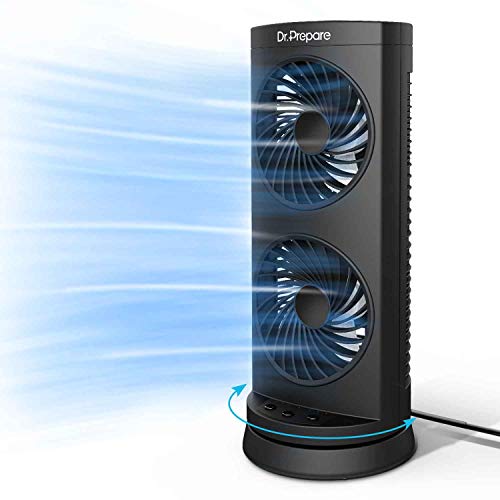
- Dual-fan design for increased air movement
- 110-degree oscillation sweeps a wide area
- Three speed settings and 2/4/8-hour timers
Best For: Portable desktop cooling with broad oscillation
Best High-Velocity Pick – DREO 36-Inch Quiet Tower Fan
For shoppers comparing tower fans for home offices, the DREO DR-HTF007 stands out for strong airflow, quiet operation, and detailed control. Its brushless DC motor reaches up to 28 ft/s, while eight speeds, four modes, and 90-degree oscillation make it easy to tailor airflow around a desk or room.
Best For: Home offices that need powerful, adjustable airflow without excessive operating noise.
Pros:
- High-velocity airflow reaches up to 28 ft/s and projects up to 34 feet.
- Quiet operation is rated at 25 dB, with a dedicated Sleep mode.
- Eight speeds, four modes, remote control, touch controls, and a timer offer flexible adjustment.
- Removable grille and impeller simplify cleaning, and the fan is ETL certified.
Cons:
- Its 36-inch height and 11.81-inch footprint may require deliberate placement in a compact office.
- The feature-rich controls may be more than needed for shoppers seeking a basic fan.
Choose this DREO model when airflow strength and quiet performance matter equally. It is especially practical for larger work areas or for circulating air alongside an air conditioner.
Best Tall Room-Cooling Option – Lasko Wind Curve 42-Inch Tower Fan
The Lasko Wind Curve is a practical choice among tower fans for home offices when broad coverage and straightforward remote control are priorities. Its 42-inch design provides 60-degree oscillation, three speeds, and a nighttime setting that dims the controls and lowers fan speed.
Best For: Small to medium home offices where a tall, space-saving fan with simple controls is useful.
Pros:
- 60-degree oscillation helps distribute airflow across a room.
- Nighttime setting dims LED controls and reduces fan speed.
- Remote control operates power, speed, oscillation, timer, and nighttime mode.
- A 7.5-hour programmable timer and carry handle add convenience.
Cons:
- It offers three speeds, fewer than several more adjustable tower fans.
- The listed 55.4 dB noise level may not suit buyers seeking especially quiet operation.
This Lasko is a sensible fit for users who want a tall fan with uncomplicated controls and useful room coverage. Its nighttime features also make it suitable for offices that double as sleeping spaces.
Best Smart-Home Pick – GoveeLife 42-Inch Smart Tower Fan
The GoveeLife tower fan is one of the more connected tower fans for home offices, combining app, voice, and touch controls with extensive airflow settings. It offers 12 speeds, five modes, up to 150-degree oscillation, and compatibility with Alexa, Google, and Siri for hands-free adjustments.
Best For: Smart-home users who want automated, app-controlled airflow in a home office.
Pros:
- App and voice control work with Alexa, Google, and Siri.
- Twelve speeds, five modes, and up to 150-degree oscillation provide broad customization.
- A built-in sensor supports basic thermostat functions, with expanded monitoring available through compatible Govee thermo-hygrometers.
- Brushless DC motor operation is rated as low as 27 dB, and the grille and impeller are removable for cleaning.
Cons:
- 5G Wi-Fi is not supported.
- Some smart functions require app setup or a compatible Govee thermo-hygrometer.
- The 42-inch height may be less convenient for very compact workspaces.
This is the strongest match for a connected workspace, particularly if you already use Govee or voice assistants. Its wide oscillation and many settings also make it flexible for shared rooms.
Best Simple Budget-Style Option – Lasko 2510 36-Inch Tower Fan
The Lasko 2510 keeps the essentials straightforward for shoppers seeking tower fans for home offices. It combines three quiet speeds, 60-degree oscillation, a 7-hour auto-off timer, and a multifunction remote in a lightweight 36-inch design.
Best For: Smaller offices that need uncomplicated cooling, remote control, and a compact freestanding design.
Pros:
- Three quiet speeds support work, relaxation, and sleep.
- 60-degree oscillation helps spread airflow through small to medium rooms.
- A 7-hour timer and remote control make day-to-day operation convenient.
- Lightweight, freestanding construction is easy to place and move.
Cons:
- It has only three speeds and fewer modes than more feature-rich models.
- The listed 54.5 dB noise level is higher than the quietest fans in this roundup.
- Its 210 CFM airflow capacity is modest compared with the supplied alternatives.
The 2510 is a good basic choice when you value simple operation over smart features or high-velocity performance. Its smaller profile and timer make it easy to integrate into a focused desk setup.
Quiet Adaptive Cooling – Levoit Classic 36-Inch Tower Fan
For home offices that need comfortable airflow without constant background noise, the Levoit Classic 36-inch tower fan is a practical choice. It offers up to 28 ft/s airflow, wide oscillation, five speeds, and an Auto Mode that adjusts airflow using a built-in temperature sensor.
Best For: Quiet home offices, bedrooms, and shared spaces where automatic temperature adjustments are useful.
Pros:
- Quiet 28 dB low-speed operation
- Five speeds and four modes, including Sleep and Auto
- Remote control, 12-hour timer, and wide oscillation
- Slim 36-inch design fits neatly beside a desk or wall
Cons:
- Uses a corded wall connection and requires floor space
- Plastic construction may not appeal to shoppers seeking a premium finish
The temperature-sensing Auto Mode and quiet low setting make this one of the more office-friendly tower fans for home offices, while Turbo mode provides stronger airflow when the room heats up.
High-Velocity Workhorse – Lasko 35-Inch Oscillating Tower Fan
The Lasko U35115 is built for shoppers who want noticeably forceful airflow from a slim tower-style fan. It produces up to 509 CFM and 25% more air velocity than traditional room fans, making it a strong option for home offices that run warm or need extra ventilation.
Best For: Hot home offices, large work areas, garages, and users who prioritize powerful airflow over quiet operation.
Pros:
- High-velocity airflow rated at up to 509 CFM
- Three powerful speeds and widespread oscillation
- Remote control and programmable seven-hour timer
- Slim, lightweight design with no-tools assembly
Cons:
- 56.35 dB noise level may be distracting during calls or focused work
- Uses 96 watts, more than the other listed models
- Offers three speeds rather than a broader range of settings
Choose this Lasko if cooling strength is your main concern. Its high-velocity performance suits warm workspaces, but its louder operation makes it less suitable for quiet video calls or noise-sensitive users.
Smart Office Comfort – Pelonis 40-Inch Bladeless Tower Fan
The Pelonis 40-inch bladeless tower fan combines strong airflow with quiet operation and convenient controls, making it well suited to tower fans for home offices. Its 26 ft/s wind speed, 90-degree oscillation, and Sensi Cool Technology help distribute and adjust airflow across a workspace.
Best For: Home offices and bedrooms where low noise, remote access, and automatic cooling are priorities.
Pros:
- Quiet 27 dB operation
- 26 ft/s wind speed and wide 90-degree oscillation
- Remote control works from up to 30 feet away
- 15-hour timer, LED display, and temperature-responsive Sensi Cool Technology
Cons:
- Only three standard speed settings
- Taller 40-inch profile and approximately 11.8-inch square footprint need more placement space
This Pelonis model is a balanced pick for desk-side or room-wide cooling. Its quiet motor and long timer are useful during workdays, while the remote and temperature-responsive mode reduce the need to interrupt your workflow.
Quiet Desk Cooling – DR.PREPARE 16-Inch DC Tower Fan
For shoppers comparing tower fans for home offices, the DR.PREPARE offers quiet, adjustable cooling in a compact desktop format. Its DC motor, eight speeds, remote control, timer, and 80-degree oscillation make it easy to fine-tune airflow while working.
Best For: Home-office desks, bedrooms, and users who prioritize quiet operation and precise controls.
Pros:
- DC motor operates as quietly as 25 dB while delivering airflow up to 23 ft/s.
- Eight speed settings provide more adjustment than basic three-speed fans.
- Remote control, touchscreen controls, 1–8-hour timer, and 80-degree oscillation add convenience.
- Detachable impeller wheel and rear guard make cleaning easier.
Cons:
- Its 16-inch tabletop design is intended for personal or nearby cooling rather than whole-room floor coverage.
- It uses corded electric power, so placement depends on access to an outlet.
This is a strong fit when quiet performance and control flexibility matter more than maximum room-wide circulation. The compact footprint also works well beside a monitor or on a small office surface.
Simple Room Circulation – Amazon Basics 28-Inch Oscillating Tower Fan
If you want straightforward tower fans for home offices, the Amazon Basics 28-inch model focuses on broad airflow and uncomplicated mechanical controls. Its 60-degree oscillation and three speed settings suit users who prefer a conventional floor-standing fan without remote or electronic features.
Best For: Offices, bedrooms, and living spaces needing simple, wide-area air circulation.
Pros:
- 28-inch tower format is suited to floor placement and room cooling.
- 60-degree oscillation helps distribute airflow across a wider area.
- Three speed settings offer basic airflow customization.
- Top-mounted mechanical controls are easy to operate.
Cons:
- It lacks a remote control and timer.
- Three speeds provide less adjustment than models with more power levels.
- The supplied specifications list a 100-watt rating, which may use more power than compact DC desk fans.
This model is a practical choice for buyers who value a familiar push-button setup and floor-standing coverage. It is less feature-rich, but its simple design can be appropriate for a shared office or room where easy operation is the priority.
Wide Personal Airflow – DR.PREPARE 13-Inch Dual-Fan Tower
Among tower fans for home offices, this 13-inch DR.PREPARE model stands out for its dual-fan design and unusually broad 110-degree oscillation. Three speed settings, three auto-off timer choices, and a portable tabletop build make it useful for focused cooling in a workspace or bedroom.
Best For: Desktop users who want wide-sweeping personal airflow from a compact fan.
Pros:
- Dual fans are designed to increase air movement in stuffy spaces.
- 110-degree oscillation covers a broad horizontal area.
- 2-, 4-, and 8-hour auto-off timers support scheduled cooling.
- Compact 13-inch, 2.4-pound design is easy to place or move.
Cons:
- It has only three speed settings.
- Button controls are less convenient than a remote-operated model.
- The listed noise level is under 60 dB, so it may be more noticeable than an ultra-quiet fan.
This fan makes sense when oscillation range and portability are more important than extensive controls. Its dual-airflow setup can help cover a desk area or nearby seating position without requiring a larger floor unit.
How We Picked the Best Tower Fans for Home Offices
We focused on features that matter during a workday rather than bedroom-only claims or maximum specifications. Our comparison considers published noise levels, speed range, oscillation coverage, fan height, control options, timer settings, and the practicality of each design in a home-office layout.
Models with multiple speeds are useful for fine-tuning airflow around a desk, while remote controls help you make adjustments without interrupting a call. We also considered compact options for smaller rooms and stronger models for offices that need broader circulation.
Quick Comparison
| What to Compare | Why It Matters |
|---|---|
| Noise rating and low-speed performance | Helps preserve concentration and clearer video calls. |
| Oscillation range | Spreads airflow across a room instead of cooling one fixed spot. |
| Speed and mode selection | Provides better control as room temperature changes. |
| Remote, timer, or smart controls | Makes operation easier during work and scheduled breaks. |
| Size and stability | Determines whether the fan fits safely beside a desk or wall. |
Key Buying Factors for Tower Fans for Home Offices
Noise and Airflow Balance
Quiet operation is essential near a microphone, but the quietest setting may not provide enough cooling for a warm office. Look for a broad speed range so you can use gentle airflow during calls and stronger circulation between meetings.
Room Coverage and Oscillation
Wider oscillation can distribute air across a shared office or larger room. A compact fan with limited movement may be better for one person seated close by, especially when floor space is limited.
Controls, Timers, and Placement
Remote controls are convenient when the fan sits across the room. Timers can reduce unnecessary runtime at the end of the workday. Before buying, check the fan’s height, base footprint, cord placement, and proximity to your desk, curtains, and walkways.
Who Should Buy Which Tower Fans for Home Offices?
- For quiet focused work: Choose a model with a low published noise level and several gentle speed settings.
- For larger home offices: Prioritize taller fans, stronger airflow, and wider oscillation.
- For small desks or compact rooms: Consider a smaller portable design that can direct air toward one workstation.
- For meeting-heavy workdays: A remote control, timer, and quiet low setting are especially useful.
- For simple operation: A mechanical-control model can be a practical choice when you do not need extra modes or connectivity.
Whichever model you choose, place it on a level surface with clear airflow around the intake and outlet. Start at the lowest comfortable speed, then increase airflow only as needed to balance cooling with a distraction-free workspace.