The best smart locks for apartments add keyless entry, temporary access, and remote control without always requiring a full door-hardware replacement. The right choice depends on your existing deadbolt, rental restrictions, connectivity needs, and preferred unlocking method.
We compared retrofit models, keypad deadbolts, fingerprint locks, and Wi-Fi-enabled options to help you find a practical fit for apartment living, guests, roommates, and short-term rentals.
Best 10 Smart Locks for Apartments Picks for 2026
Best Retrofit Pick
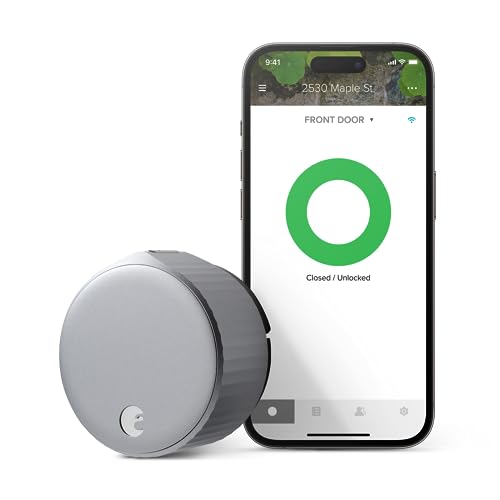
- Retrofits most single-cylinder deadbolts
- Built-in Wi-Fi with broad smart-home support
- Optional auto-unlock and guest access
Best For: Renters wanting discreet smart access without replacing the exterior lock
Best Complete Handle Set

- Includes a matching handle set
- Fingerprint, PIN, app, and voice access
- Remote access history and status checks
Best For: Apartment residents replacing a lock with a complete smart handle set
Best Battery Life

- Around eight months of battery life
- Six unlocking methods, including fingerprint
- Built-in Wi-Fi and eufy ecosystem support
Best For: Users wanting flexible access and fewer battery changes
Best All-Around Wi-Fi Pick

- Five ways to unlock, including Wi-Fi app control
- Up to 200 codes with access logs and alerts
- No-drill standard deadbolt installation
Best For: Households and renters needing flexible remote access
Best Fingerprint Knob

- Fingerprint entry with 0.2-second recognition claim
- Local biometric storage with app logs and codes
- Rechargeable battery rated for 10,000 unlocks
Best For: Indoor apartment doors and bedrooms needing biometric access
Best for Remote Guest Access

- Remote app control works without an extra hub
- Supports fingerprint, voice, passcodes, and keys
- Scheduled codes, access history, alerts, and Away Mode
Best For: Apartment households managing guests remotely
Best with Extra Features
Yale Approach Smart Wi-Fi Deadbolt

- Installs inside the door over an existing deadbolt
- Includes Wi-Fi bridge for remote access
- Offers virtual keys and activity tracking
Best For: Renters and apartment residents preserving existing keys
Best Fingerprint Entry

- Unlocks with a fingerprint in about 0.5 seconds
- Built-in Wi-Fi enables remote app control
- Includes keypad, app, fingerprint, and key access
Best For: Users wanting fast biometric apartment entry
Best Multi-Access Option
Sifely S WiFi Fingerprint Door Lock
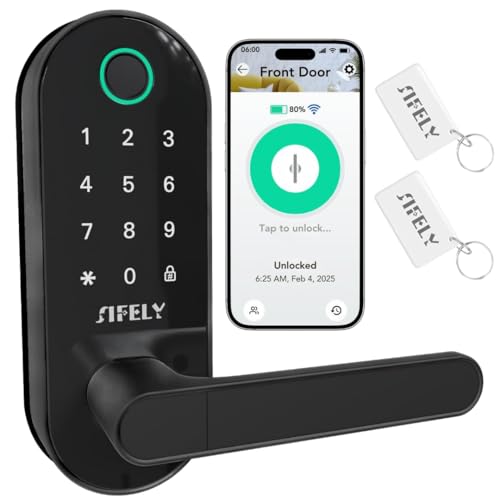
- Built-in Wi-Fi needs no separate gateway
- Supports fingerprints, codes, cards, fobs, and keys
- Includes access logs and temporary codes
Best For: Hosts and property managers sharing apartment access
Best Retrofit Pick – August Wi-Fi Smart Lock
For apartments where you want smart access without changing the exterior hardware, the August Wi-Fi Smart Lock is a practical option. It installs on the inside of most single-cylinder deadbolts, keeps your existing keys usable, and includes built-in Wi-Fi for app and voice control.
Best For: Renters or apartment residents who want a discreet retrofit lock with remote access.
Pros:
- Fits over an existing deadbolt and installs in about 10 minutes.
- Supports permanent, scheduled, and temporary app-based access.
- Built-in Wi-Fi works with Alexa, Google Assistant, Apple HomeKit, and SmartThings.
- Optional auto-unlock, auto-lock, and DoorSense features add convenience.
Cons:
- The keypad is sold separately for code-based entry.
- Requires a compatible smartphone and 2.4GHz or 5GHz Wi-Fi connection.
August is a strong choice among smart locks for apartments when preserving your current deadbolt and front-door appearance matters more than having a new exterior keypad.
Best Complete Handle Set – Philips Wi-Fi Keypad Deadbolt
The Philips Wi-Fi Keypad Deadbolt is a full front-door lock set with a matching handle, built-in Wi-Fi, fingerprint access, and remote app controls. It suits apartment residents replacing an existing lock rather than retrofitting the interior mechanism.
Best For: Users who want keypad, fingerprint, app, and handle-set functionality in one package.
Pros:
- Includes a matching handle set, so additional handle hardware is not required.
- Supports permanent, one-time, periodic, and recurring PIN codes.
- Fingerprint access is designed to unlock in about 0.3 seconds.
- Remote status checks, access history, and voice control are available through the app and compatible assistants.
Cons:
- Batteries are not included.
- It connects to 2.4GHz Wi-Fi and should remain within about 33 feet of the router.
- Auto-lock is off by default and must be enabled manually.
With its complete hardware set and multiple entry methods, this Philips model is a versatile pick for apartments where replacing the existing door hardware is allowed.
Best Battery Life – eufy Security Smart Lock C220
The eufy Security Smart Lock C220 combines built-in Wi-Fi with six entry methods, including fingerprint, keypad, app, physical key, Apple Watch, and voice control. Its claimed eight-month battery life and apartment-door compatibility make it a feature-rich choice for everyday use.
Best For: Apartment users who prioritize flexible entry methods, long battery life, and eufy ecosystem integration.
Pros:
- Offers six ways to unlock, including fingerprint and physical key access.
- Built-in Wi-Fi enables control from anywhere without a bridge.
- Runs for around eight months on eight AA batteries, depending on use.
- Designed for easy installation on many standard deadbolts without drilling.
Cons:
- Uses eight AA batteries, which are more numerous than some alternatives require.
- Compatibility still depends on the existing deadbolt and bore dimensions.
The C220 stands out among smart locks for apartments for its broad unlocking flexibility and durable, weather-resistant design, especially if you already use other eufy devices.
Best Apple Home Key Retrofit – Aqara Smart Lock U200
The Aqara Smart Lock U200 adds smart features to an existing deadbolt without permanent modifications, making it especially appealing for renters. It supports Apple Home Key, fingerprint access, passcodes, Bluetooth, NFC, and physical keys, though Apple Home features require a compatible Thread-enabled Apple hub.
Best For: Apple households and renters seeking a removable retrofit lock with fingerprint and passcode entry.
Pros:
- Retrofit design preserves the existing deadbolt and avoids rekeying.
- Apple Home Key enables iPhone or Apple Watch tap-to-unlock with the required hub.
- Fingerprint recognition works in under 0.3 seconds and supports up to 25 fingerprints.
- Includes flexible passcode options, anti-peeping protection, and scheduled quiet mode.
Cons:
- Apple Home Key and Apple features require a Thread-enabled Apple hub.
- Remote smart-home connectivity depends on the listed ecosystem requirements; the app’s direct controls use Bluetooth.
- NFC cards are sold separately.
For renters comparing smart locks for apartments, the U200 is compelling because it adds substantial access flexibility while allowing the original deadbolt to remain in place.
Best All-Around Wi-Fi Pick – Tapo DL100 Smart Deadbolt
For apartment residents who want broad access control and remote management, the Tapo DL100 is a practical choice among smart locks for apartments. It supports keypad, Bluetooth, Wi-Fi app, voice, and physical-key entry, while its standard deadbolt fit is designed for no-drill installation.
Best For: Renters and households that want flexible entry methods, guest codes, and remote access.
Pros:
- Offers keypad, Bluetooth, Wi-Fi, voice, and backup-key unlocking.
- Supports up to 200 customizable codes with activity timestamps and alerts.
- Includes auto-lock, PIN-attempt limiting, USB-C emergency power, and IP54 weather resistance.
Cons:
- Wi-Fi operation uses more battery than Bluetooth mode.
- As a deadbolt, it may not suit doors using a knob-style lock.
The DL100 balances convenience and monitoring well, especially for apartments where sharing temporary access and checking the door remotely are useful. Confirm your existing lock dimensions before ordering.
Best Fingerprint Knob – GHome 4-in-1 Smart Door Lock
The GHome smart knob stands out among smart locks for apartments when quick biometric entry matters. It combines fingerprint recognition with passwords, Bluetooth app control, and mechanical keys, and stores fingerprint data locally rather than in the cloud.
Best For: Apartment bedrooms, offices, and indoor doors where fingerprint access and local data storage are priorities.
Pros:
- Provides fingerprint, password, Bluetooth app, and mechanical-key access.
- Stores biometric data locally and supports access logs, temporary codes, and passage mode.
- Rechargeable battery is rated for up to 10,000 unlocks or more than 300 days, depending on use.
Cons:
- Bluetooth app control is limited to Bluetooth range rather than remote Wi-Fi access.
- It is intended for indoor use and requires checking door thickness and dimensions.
This model is a focused option for interior apartment doors, especially if you prefer touching a sensor instead of entering a code. Its knob format and size-specific compatibility make measuring the door essential.
Best for Remote Guest Access – Philips Wi-Fi Smart Deadbolt
The Philips Wi-Fi Smart Deadbolt is a strong candidate among smart locks for apartments when remote control and guest scheduling are central to your setup. Built-in Wi-Fi enables app access without an extra hub, while fingerprint, passcode, key, and voice options give residents several ways to enter.
Best For: Families, renters, and hosts who need remote unlocking, scheduled codes, and access history.
Pros:
- Supports app, passcode, fingerprint, physical-key, and voice unlocking.
- Built-in Wi-Fi enables remote control without a separate hub.
- Offers up to 100 custom passcodes, one-time or scheduled codes, alerts, logs, and Away Mode.
Cons:
- Batteries are not included and AA alkaline batteries are required.
- It supports only 2.4GHz Wi-Fi and works best when the router and lock are within 65 feet.
- It does not include a door sensor.
The Philips model is especially useful for coordinating visitors or service providers while away. Its remote features are compelling, but check your network setup and door thickness before installation.
Best with Extra Features – Yale Approach Smart Wi-Fi Deadbolt
The Yale Approach is a practical choice for apartments where you want smart access without replacing the existing deadbolt. This inside-mounted retrofit lock works through the Yale Access app and includes a Wi-Fi bridge for remote control, activity tracking, and virtual key sharing.
Best For: Apartment residents who want keyless app access while keeping their existing keys as a backup.
Pros:
- Installs inside the door without replacing the existing deadbolt.
- Includes Yale Connect Wi-Fi Bridge for remote app control.
- Supports unlimited virtual keys, activity tracking, auto-lock, and auto-unlock.
- Works with Alexa, Google Assistant, SmartThings, Android, and iOS.
Cons:
- Does not include a keypad, so entry is primarily app- or key-based.
- Compatibility depends on the apartment door’s existing deadbolt.
Choose the Yale Approach when preserving the current lock hardware matters. Its retrofit design is especially useful for renters or apartment dwellers who want connected access without a visible exterior hardware change.
Best Fingerprint Entry – Wyze Auto-Lock Bolt v2
The Wyze Auto-Lock Bolt v2 adds biometric entry to the smart locks for apartments category, with fingerprint, keypad, app, and physical-key access. Built-in Wi-Fi enables remote management, while the rechargeable-emergency option helps if the batteries run out.
Best For: Apartment users who prioritize fast fingerprint entry and several backup unlocking methods.
Pros:
- Fingerprint scanner is designed to unlock in 0.5 seconds.
- Built-in Wi-Fi supports remote checking and management through the Wyze app.
- Provides fingerprint, app, code, and physical-key entry options.
- Includes eight AA batteries rated for up to eight months and USB-C emergency power.
Cons:
- It is a bolt-style lock rather than a retrofit lock, so door compatibility should be checked.
- Its stated recommended use is home, which may require confirming apartment-door installation rules.
The Wyze stands out when quick, keyless entry is the priority. Its combination of biometric access, Wi-Fi control, and physical backup keys gives apartment residents flexibility for everyday entry and emergencies.
Best Multi-Access Option – Sifely S WiFi Fingerprint Door Lock
The Sifely S WiFi combines a handle, keypad, fingerprint reader, and built-in Wi-Fi in one entry system. For apartment residents, its app-based user management, access logs, temporary codes, and remote control can be useful when sharing access with guests or managing a rental.
Best For: Apartment owners, hosts, and property managers who need multiple entry methods and remote access without a separate gateway.
Pros:
- Built-in Wi-Fi provides remote app access without an additional gateway.
- Supports fingerprints, passcodes, app control, key fobs, cards, and mechanical keys.
- Offers temporary access codes, user management, access logs, auto-lock, and low-battery alerts.
- Compatible with Alexa and Google Assistant for voice control.
Cons:
- The handle-and-lock design may require more installation space than a basic deadbolt.
- Its broad feature set may be more than needed for a single-occupant apartment.
This is the most versatile option of the three for shared access. Select it if built-in Wi-Fi, temporary codes, and several credential types are more important than a minimalist retrofit design.
How We Picked the Best Smart Locks for Apartments
We focused on the features that matter most in an apartment: compatibility with common deadbolts, installation difficulty, access methods, connectivity, battery expectations, and control over guest permissions. Retrofit locks received special attention because they can preserve the exterior hardware and reduce the likelihood of needing landlord approval. We also considered keypad and fingerprint models for households that want to avoid carrying keys or using a phone every time.
Because apartment doors and building policies vary, check the product’s compatibility requirements before ordering. A smart lock may not work with every deadbolt, multipoint mechanism, or shared-entry setup.
Quick Comparison
| Lock type | Best for | Main advantage | Potential limitation |
|---|---|---|---|
| Retrofit smart lock | Renters and simple upgrades | Usually keeps existing exterior hardware | Requires a compatible interior deadbolt |
| Keypad deadbolt | Families and frequent guests | Convenient code-based entry | May require replacing the deadbolt |
| Fingerprint lock | Fast everyday access | Unlocks without a phone or code | Recognition can vary with dirt, moisture, or wear |
| Wi-Fi smart lock | Remote access and monitoring | Control from outside the home | Often uses more battery power |
| Apple Home Key model | Apple-centric households | Tap-to-unlock convenience | Best experience depends on compatible devices |
Key Buying Factors for Smart Locks for Apartments
Compatibility and Installation
Measure your existing deadbolt and confirm the lock’s supported dimensions. Retrofit designs are usually the least disruptive, while complete deadbolt replacements can offer a cleaner all-in-one keypad or fingerprint setup. If you rent, avoid drilling or permanent modifications unless your landlord approves them.
Connectivity and Remote Control
Bluetooth is useful for nearby control and can help conserve battery life. Built-in Wi-Fi enables remote locking, unlocking, notifications, and guest management without an additional bridge, but it may increase power consumption. Confirm whether remote features require a subscription, hub, or separate accessory.
Access Methods and Security
Choose a keypad if you regularly share access with roommates, cleaners, or guests. Fingerprint readers are convenient for personal entry, while app control is helpful for checking status and managing virtual keys. Look for auto-lock settings, activity history, low-battery alerts, emergency power options, and a physical key or other backup method.
Battery Life and Apartment Realities
Battery life depends on usage, Wi-Fi activity, temperature, and motor resistance. A model with clear low-battery warnings and an external emergency charging option is easier to live with. Make sure the door closes and aligns smoothly; a lock motor cannot reliably compensate for a sticking or misaligned door.
Who Should Buy Which Smart Locks for Apartments?
- Renters: Start with a retrofit lock that works with your current deadbolt and leaves the exterior unchanged.
- Families and roommates: Choose a keypad model with multiple codes and straightforward user management.
- Phone-free convenience seekers: A fingerprint lock can provide quick entry without remembering a code.
- Frequent hosts: Prioritize Wi-Fi, remote control, temporary codes, and access-history features.
- Apple households: Consider a lock with Apple Home Key support if tap-to-unlock fits your devices and routine.
Before buying, verify door compatibility, apartment approval requirements, battery access, and the backup-entry method. Those details usually matter more than advanced features you may rarely use.