The Rongta RP425 Bluetooth Shipping Label Printer review is all about speed, convenience, and compact shipping-label output.
If you want a small thermal printer that works from a phone or desktop, the Rongta RP425 Bluetooth Shipping Label Printer deserves a close look.
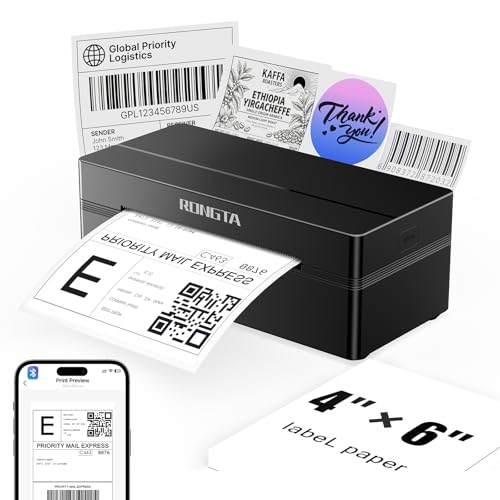
Rongta RP425 Review Summary
The Rongta RP425 Bluetooth Shipping Label Printer is a practical buy for small sellers, home offices, and anyone who ships regularly and wants a fast label workflow without ink or toner.
It is especially appealing if you print a lot of 4×6 shipping labels, barcode labels, or QR codes and want the flexibility of Bluetooth on mobile plus USB on desktop.
What makes it stand out is the balance of mobile convenience, broad compatibility, and compact size.
It is not a general-purpose printer, and that is actually part of the appeal: the RP425 is focused on doing one job well.
For buyers who want a dedicated thermal label solution for Amazon, Shopify, Etsy, UPS, or office labeling, it offers a strong feature set for the category.
Scorecard
| Category | Score | Why It Matters |
|---|---|---|
| Mobile Connectivity | 9.0 | Bluetooth support with app-based setup makes it easy to print from iOS and Android phones and tablets. |
| System Compatibility | 8.0 | Works with Windows, Mac, and Chrome OS, giving it broad coverage for home offices and small businesses. |
| Label Handling | 9.0 | Automatic label identification and feed support reduce manual alignment and help with common shipping and barcode label sizes. |
| Printing Speed | 8.0 | The thermal engine is built for fast, high-volume label output, which suits shipping and warehouse workflows. |
| Print Clarity | 8.0 | 203 dpi direct thermal printing should provide sharp text, barcodes, and QR codes for practical shipping use. |
| Portability | 8.0 | The compact, lightweight design is easy to store on a desk or move between workspaces. |
| Setup Simplicity | 7.0 | Bluetooth app pairing is straightforward, though desktop users still need to install drivers from the brand site. |
Overall, this is a smart value pick for label-first workflows.
It is not the most versatile device for every office task, but for shipping and barcode printing, it is designed to be efficient, space-saving, and easy to live with.
Key Features and Specifications of Rongta RP425
The Rongta RP425 Bluetooth Shipping Label Printer is a direct thermal label printer, which means it prints without ink, toner, or ribbons.
That design choice keeps operating costs lower and makes it easier to maintain than an inkjet or laser printer.
| Brand | Rongta |
| Model | RP425 Thermal Label Printer Bluetooth |
| Printer Type | Thermal |
| Connectivity | Bluetooth, USB |
| Print Output | Monochrome |
| Print Function | Print only |
| Media Type | Labels |
| Maximum Media Size | 4 x 6 inch |
| Supported Label Width | 0.98 inch to 4.37 inch |
| Print Speed | Up to 150 mm/s |
| Resolution | 203 dpi |
| Maximum Sheet Capacity | 100 |
| Weight | 0.65 kg |
| Dimensions | 10.2 x 7.4 x 5.3 inches |
| Color | Black |
| Supported Systems | iOS, Android, Windows 7+, Mac OS 10.11+, Chrome OS |
From a buyer’s perspective, those specs point to a printer built for shipping labels, warehouse tags, and barcode-heavy tasks.
The 203 dpi resolution is the right baseline for crisp text and scannable codes, while the 150 mm/s top speed is useful when you are processing many orders in a day.
The compatibility list is also a major selling point.
The Rongta RP425 Bluetooth Shipping Label Printer supports phone and tablet printing through the RLabel app, and it can also work over USB on desktop systems.
That gives it a useful edge if your workflow changes between mobile order management and office-based printing.
Pros and Cons of Rongta RP425
Here is a practical look at the Rongta RP425 Bluetooth Shipping Label Printer pros and cons from a real buyer’s perspective.
| Pros | Cons |
| Easy phone-and-tablet printing through Bluetooth | Prints in monochrome only |
| Broad compatibility with major desktop and mobile systems | Desktop use requires driver installation |
| Auto label detection helps reduce setup mistakes | Best suited to labels rather than general document printing |
| Supports a wide range of label sizes and use cases | Bluetooth workflow depends on app setup |
| Compact and easy to store | Not ideal if you need color branding or full-page documents |
What the pros really mean: setup is easier than on many budget thermal printers, and the auto-grab/auto-feed behavior helps reduce wasted labels.
The wide label-width support also makes the RP425 more versatile than a single-purpose 4×6-only machine.
What the cons really mean: if you want a printer for invoices, photos, or color labels, this is the wrong category.
It is also worth noting that desktop users will have a slightly more involved setup process because driver installation is part of the workflow.
Who Should Buy Rongta RP425?
The Rongta RP425 Bluetooth Shipping Label Printer fits buyers who need a dedicated label printer and want a mix of mobile convenience and desktop flexibility.
It is a good match for:
- Marketplace sellers shipping through Amazon, Shopify, Etsy, eBay, UPS, or similar platforms.
- Home office users who print labels for outgoing parcels, folders, or organization.
- Small business owners who want a compact thermal printer for daily shipping tasks.
- Mobile-first users who prefer printing from a phone or tablet.
- Warehouse or stockroom teams that need barcode and QR label output.
It is less suitable for buyers who need a traditional all-purpose printer.
If you want color printing, duplex document output, or mixed office use, you should skip this and look at a broader printer category instead.
How the Bluetooth App Workflow Works
For many buyers, the biggest appeal of the Rongta RP425 Bluetooth Shipping Label Printer is the app-based mobile workflow.
The printer supports iOS and Android devices through the RLabel app, which is useful if you manage orders from a phone or tablet rather than a laptop.
That mobile-first process is one of the reasons this printer scores so well for connectivity.
Instead of being locked into a desktop environment, you can connect quickly, prepare a label, and print without having to sit at a full workstation.
For sellers who move between packing tables, desks, and storage areas, that flexibility matters.
The trade-off is that the app-centered workflow is only as smooth as the software setup.
Buyers should expect a short learning curve if they are new to thermal label printing.
Once configured correctly, though, the system should be efficient enough for repeated daily use.
If you want to see how the mobile workflow fits your setup, a good next step is to compare it with other compact label printers.
Check whether Bluetooth printing will genuinely save you time before buying:
Label Size Support and Auto-Feed Performance
Label handling is one of the strongest parts of the Rongta RP425 Bluetooth Shipping Label Printer.
It supports direct thermal labels from 0.98 inches to 4.37 inches wide, with a maximum media size of 4 x 6 inches.
That range covers the most common shipping label sizes plus smaller inventory and identification labels.
It is also compatible with a variety of label formats, including:
- 4×6 shipping labels
- 2×2 circular labels
- 2×1 barcode labels
- 1×1 QR code labels
The automatic label identification and auto-grab/feed features are especially helpful if you have ever wasted time aligning labels manually.
For buyers who ship in batches, this can save frustration and reduce wasted supplies.
It also makes the RP425 more beginner-friendly than some label printers that expect you to fine-tune settings repeatedly.
That said, buyers should still check their label stock before ordering.
The printer’s strengths are clearest when used with compatible direct thermal media, not generic labels of uncertain sizing.
Windows, Mac, and Chrome OS Setup
Desktop compatibility is broad, which is a major reason the Rongta RP425 Bluetooth Shipping Label Printer stands out in its class.
It supports Windows 7 and newer, Mac OS 10.11 and newer, and Chrome OS.
That makes it a versatile choice for households and small businesses with mixed hardware.
However, desktop users should know that the driver must be downloaded from the official Rongta website.
That is not unusual for label printers, but it does mean the setup is not quite as plug-and-play as some buyers hope.
If you are comfortable installing printer drivers, this should not be a deal-breaker.
The upside is that you gain USB printing as a reliable fallback when Bluetooth is not the best option.
For office environments, that dual connectivity is a genuine advantage because it lets one printer serve multiple workflows.
Desk Space, Portability, and Storage
The Rongta RP425 Bluetooth Shipping Label Printer is compact enough to fit on a small desk, shelf, or packing station.
At about 0.65 kg and measuring 10.2 x 7.4 x 5.3 inches, it is easy to move around when needed and easy to store when not in use.
That matters more than many buyers realize.
In a home office or small business setup, every inch of desk space counts.
A printer with a smaller footprint can make a packing area feel more organized and less cluttered, especially if you already keep tape, mailers, and scales nearby.
The black finish is simple and professional, which helps it blend into a workbench or office shelf instead of looking like a bulky appliance.
This is a practical design choice rather than a flashy one, and that is exactly what most label-printer buyers need.
Best Use Cases for Small Sellers and Home Offices
If you are wondering whether the Rongta RP425 Bluetooth Shipping Label Printer is the right tool for your workflow, think in terms of frequency and label type.
The printer makes the most sense when label output is repetitive and functional rather than decorative.
Best use cases include:
- Daily shipping labels for online orders
- Barcode and QR code labeling
- Inventory organization
- Folder, bin, and storage labels
- Small shipping stations with limited space
Less ideal use cases include:
- Color branding labels
- Document printing
- Photo printing
- Mixed office printing where one machine must do everything
If your workflow is built around shipping and item identification, this printer is a logical fit.
If your printer needs are broader, you should compare it with a more general-purpose solution before buying.
Alternatives to Consider Before You Buy
There are several well-known alternatives if you want to compare the Rongta RP425 Bluetooth Shipping Label Printer against other popular Amazon options.
- Rollo thermal shipping label printer — A popular thermal-label category option for buyers who want a strong shipping-focused printer with wide adoption.
- Munbyn Bluetooth shipping label printer — A close competitor if Bluetooth convenience and app-based printing are high priorities.
- Brother QL-series label printer — A useful alternative for buyers who want a more established label ecosystem and broader office use.
- DYMO thermal label printer — Worth considering if you already like DYMO’s labeling workflow and software environment.
- Zebra shipping label printer — A stronger fit for heavier-duty environments where durability and warehouse-grade labeling matter more.
Compared with these options, the Rongta RP425 leans toward compact convenience and broad everyday usability.
It may not be the most premium-feeling choice, but it can be a very sensible one if your needs are straightforward.
Is Rongta RP425 Worth It?
So, is Rongta RP425 Bluetooth Shipping Label Printer worth it?
For the right buyer, yes.
It offers a strong mix of Bluetooth printing, USB flexibility, thermal efficiency, and compact storage in a package that is clearly built for shipping labels and barcode work.
The biggest reasons to buy it are easy mobile printing, wide label support, and no-ink operation.
Those are the features that save time and reduce ongoing hassle.
The biggest reasons to skip it are also clear: it is monochrome only, it is not a general-purpose printer, and desktop setup requires driver installation.
Buy it if you want a dedicated shipping-label printer for a small business, side hustle, or home office and value convenience over extra versatility.
Skip it if you need color output, document printing, or a printer that can do much more than labels.
Bottom line: the Rongta RP425 Bluetooth Shipping Label Printer is a smart, focused tool that should satisfy buyers who want reliable thermal label printing without clutter or complexity.
If that sounds like your workflow, it is a solid candidate to put on your shortlist.