Battery-powered smart locks make it easier to control who enters your home without relying on a traditional key. The best options combine dependable battery life with convenient access methods such as PIN codes, fingerprints, apps, or automatic locking.
We compared 10 popular models across installation style, access features, connectivity, security controls, and everyday usability to help you choose a lock that fits your door, household, and budget.
Best 10 Battery Powered Smart Locks Picks for 2026
Most Innovative
- Contactless palm-vein recognition
- Dual-battery system with USB-C emergency charging
- Wi-Fi, keypad, guest codes, and voice control
Best For: Biometric entry and broad smart-home connectivity
Best Connected Value

- Up to 200 customizable access codes
- Wi-Fi, Bluetooth, app, voice, and key access
- USB-C emergency power and IP54 weather resistance
Best For: Families managing many users and guest entries
Best Simple Keypad
- Up to 365 days on four AA batteries
- 20 user codes plus a one-time PIN
- No app or network required; includes backup keys
Best For: Offline keypad access for homes, rentals, and garages
Best Fingerprint Option

- Six unlocking methods, including fingerprint and app
- Built-in Wi-Fi requires no bridge
- Around eight months of battery life with eight AA batteries
Best For: Fingerprint entry with remote control and eufy integration
Best for Easy Setup

- Up to 20 keypad entry codes
- Auto-lock and low-battery alerts
- No app, Wi-Fi, or phone setup
Best For: Simple keyless entry without connected features
Versatile Access Option
Yamiry Fingerprint Door Handle Lock

- Six unlocking methods, including fingerprint
- App supports temporary codes and unlock records
- Wi-Fi gateway needed for remote control
Best For: Rental properties and flexible household access
Connected Long-Run Choice

- Fingerprint entry in under 0.3 seconds
- Up to 14 months from a 10,000mAh battery
- Matter, Apple Home, Alexa, and Wi-Fi support
Best For: Connected smart homes wanting biometric access
Best Wi-Fi Fingerprint Pick

- Fast fingerprint unlocking with AI learning
- Built-in Wi-Fi and Wyze app control
- Eight-month battery rating with USB-C backup
Best For: Homeowners wanting biometric entry and remote access
Best Indoor Budget Option
- Five entry methods including fingerprint and IC card
- Timed, one-time, and dynamic passcodes
- Privacy lock and anti-peep keypad features
Best For: Bedrooms, offices, rentals, and Airbnb spaces
Best Premium Multi-Biometric Lock

- Face, palm-vein, fingerprint, and four other entry methods
- Up to 12 months of battery life with backup power
- Matter, Apple Home, Alexa, and Google support
Best For: Advanced smart-home households wanting biometric flexibility
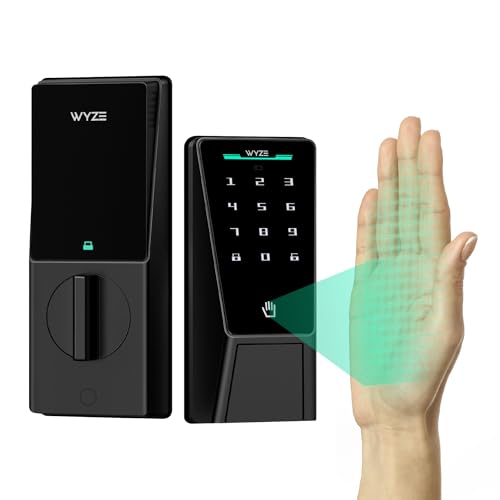
Most Innovative – Wyze Palm Lock
For shoppers comparing battery powered smart locks, the Wyze Palm Lock stands out with contactless palm-vein recognition, Wi-Fi control, and a dual-battery backup system. It also includes keypad access, auto-locking, a mechanical key, and emergency USB-C charging.
Best For: Homeowners who want biometric entry and multiple backup access methods.
Pros:
- Contactless palm-vein recognition avoids touching the lock.
- Dual batteries provide a main power source plus a two-week backup.
- Supports up to 50 guest or one-time codes and anti-peep PIN entry.
- Built-in Wi-Fi enables remote control and Alexa or Google Assistant integration.
Cons:
- Its palm-recognition feature may be more technology than some users need.
- IP53 weather resistance is lower than some competing options in this roundup.
The Wyze Palm Lock is a feature-rich choice for buyers prioritizing touch-free entry and battery-related peace of mind. Its emergency charging and mechanical-key options help reduce the risk of being locked out.
Best Connected Value – Tapo DL100 Smart Deadbolt
The Tapo DL100 is a versatile option for shoppers seeking battery powered smart locks with both local and remote access. It combines tactile keypad buttons, Bluetooth, built-in Wi-Fi, app controls, voice commands with PIN verification, and physical key backups.
Best For: Families and households that need extensive access-code management and remote monitoring.
Pros:
- Supports up to 200 customizable access codes.
- Battery life is rated up to 200 days in Wi-Fi mode or 300 days in Bluetooth mode.
- Includes USB-C emergency power, four AA batteries, and two backup keys.
- Offers activity history, real-time alerts, auto-lock, and PIN-attempt limiting.
Cons:
- Wi-Fi use has a shorter stated battery life than Bluetooth operation.
- Remote and voice features depend on app, network, or smart-home connectivity.
With a high code capacity and detailed app monitoring, the DL100 is especially practical for busy homes, guests, and visitors. Its BHMA Grade 3 certification and IP54 rating add everyday durability.
Best Simple Keypad – TEEHO TE001 Deadbolt
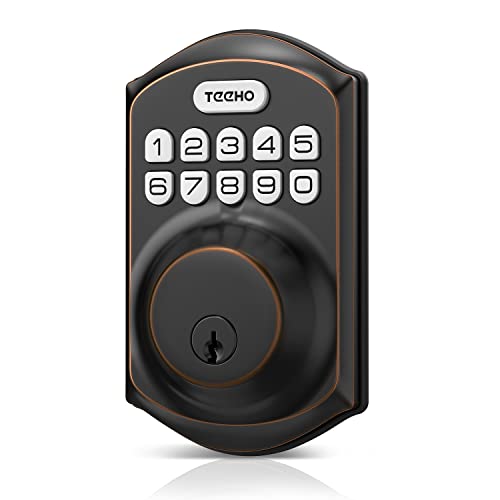
The TEEHO TE001 offers a straightforward battery powered smart locks solution without app or network connectivity. Its keypad supports family and one-time guest codes, while auto-lock, anti-peep entry, backup keys, and a low-battery indicator cover the essentials.
Best For: Renters, back doors, garages, and buyers who prefer a simple offline keypad lock.
Pros:
- Stores 20 individual user codes plus a one-time guest PIN.
- Battery life is rated up to 365 days with four AA batteries.
- Offers adjustable auto-lock timing from 10 to 99 seconds and one-touch locking.
- Includes anti-peeping protection, IP54 weather resistance, and two backup keys.
Cons:
- It has no Wi-Fi, Bluetooth, or app-based remote control.
- Four AA batteries are not included.
- It fits 2-1/8-inch door holes, but not 38mm holes.
The TE001 is a practical choice when reliable keypad access matters more than smart-home integration. Its long stated battery life and simple screwdriver installation make it well suited to basic entry points.
Best Fingerprint Option – eufy Security Smart Lock C220
The eufy Security Smart Lock C220 is a strong contender among battery powered smart locks for buyers who want fingerprint entry alongside remote control. It offers six unlocking methods, built-in Wi-Fi, self-learning fingerprint recognition, app notifications, and integration with other eufy devices.
Best For: Front-door users who want fingerprint convenience with built-in Wi-Fi and multiple backups.
Pros:
- Provides six entry methods, including fingerprint, app, keypad, key, Apple Watch, and voice control.
- Eight AA batteries are rated for around eight months of operation.
- Built-in Wi-Fi enables remote control without a bridge.
- Includes access management, event history, real-time notifications, and eufy ecosystem integration.
Cons:
- Battery life varies with how frequently the lock is used.
- Its IP53 rating offers less weather protection than the Tapo DL100’s IP54 rating.
The C220 is a flexible pick for households that want fast biometric entry without giving up keys, codes, or app access. Its built-in Wi-Fi and eufy integration make it particularly appealing to existing eufy users.
Best for Easy Setup – Yale Digital Keypad Deadbolt
For shoppers comparing battery powered smart locks without wanting app or Wi-Fi complexity, the Yale Digital Keypad Deadbolt keeps things straightforward. Its backlit keypad supports up to 20 codes, while auto-lock and low-battery alerts add useful everyday convenience.
Best For: Households wanting dependable keyless entry with simple keypad control.
Pros:
- Creates up to 20 unique entry codes directly on the lock.
- Auto-lock helps secure the deadbolt after you leave.
- Backlit keypad, backup key, and low-battery alerts support daily use.
- BHMA Grade 3 residential certification and weather-resistant construction.
Cons:
- No app, phone setup, Wi-Fi, or remote-control features.
- Access management is handled at the keypad rather than through a mobile app.
The Yale is a practical choice when the goal is key-free access rather than connected-home integration. It offers useful code sharing and auto-lock while avoiding the learning curve and connectivity requirements of more advanced battery powered smart locks.
Versatile Access Option – Yamiry Fingerprint Door Handle Lock
The Yamiry smart door handle combines fingerprint recognition, app control, passcodes, fobs, and mechanical keys in one battery powered smart lock. It is aimed at users who want flexible entry methods and app-based access management for a home or rental property.
Best For: Landlords, hosts, and households needing multiple access methods and remote passcode management.
Pros:
- Supports fingerprints, Bluetooth app control, passcodes, fobs, mechanical keys, and optional Alexa control.
- App can provide permanent or temporary access, one-time codes, and unlock records.
- Designed for screwdriver installation on most standard American wooden front doors.
- Reversible handle accommodates left- or right-handed doors.
Cons:
- Remote control and Alexa features require a separately sold Wi-Fi gateway.
- Its many access methods may involve more setup than a basic keypad lock.
With broad unlocking flexibility and centralized app management, the Yamiry is especially suited to properties with changing occupants. Just account for the additional gateway requirement if remote access or voice control is important.
Connected Long-Run Choice – eufy Security Smart Lock E31
The eufy Security Smart Lock E31 is a feature-rich option among battery powered smart locks, pairing fingerprint entry with built-in Wi-Fi, Matter support, and major smart-home platforms. Its rechargeable 10,000mAh battery is rated for up to 14 months under the stated usage conditions.
Best For: Smart-home users who want fingerprint access, remote control, and broad platform compatibility.
Pros:
- Unlocks by fingerprint, app, keypad, physical key, or supported voice assistant.
- Works with Apple Home, Google Home, Alexa, SmartThings, and Matter.
- 10,000mAh rechargeable battery offers up to 14 months of typical runtime.
- Includes auto-lock, low-battery alerts, event logs, and remote unlocking.
Cons:
- The advertised battery life depends on usage, based on an average of 10 unlocks per day.
- Remote features rely on a compatible hub or smart-home platform.
The E31 stands out for combining fast biometric entry with connected-home controls and a large rechargeable battery. It is a strong fit for buyers who want more than keypad access, provided their existing smart-home ecosystem is compatible.
Best Wi-Fi Fingerprint Pick – Wyze Auto-Lock Bolt v2
For shoppers comparing battery powered smart locks, the Wyze Auto-Lock Bolt v2 combines fast fingerprint entry with built-in Wi-Fi, keypad access, app control, and physical-key backup. Its included AA batteries are rated for up to eight months, while USB-C emergency power helps if the batteries run out.
Best For: Homeowners who want biometric entry, remote app access, and several backup unlocking methods.
Pros:
- Fingerprint scanner can unlock the door in about 0.5 seconds.
- Built-in Wi-Fi supports remote lock management through the Wyze app.
- Offers fingerprint, app, code, and physical-key entry options.
- Includes eight AA batteries and USB-C emergency power.
Cons:
- Battery life is rated for up to eight months, shorter than some listed alternatives.
- Its included features are centered on the Wyze ecosystem.
The Bolt v2 is a practical choice when quick fingerprint recognition and remote access matter most. The smudge-resistant glass, auto-lock feature, and emergency USB-C power add useful everyday convenience.
Best Indoor Budget Option – 5-in-1 Fingerprint Door Lock
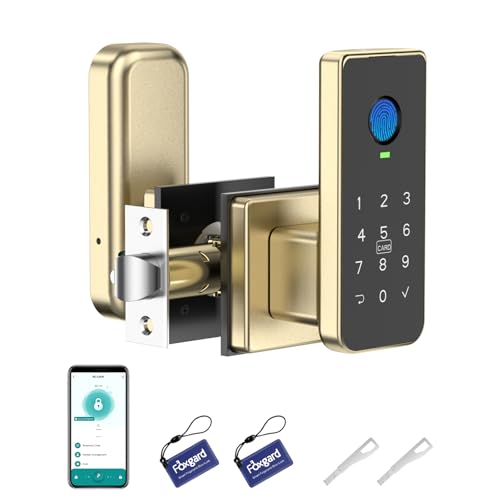
This indoor-focused option stands out among battery powered smart locks for its five entry methods: fingerprint, keypad, app, IC card, and mechanical key. It runs on four AA batteries and adds timed or one-time passcodes, access logs, anti-peep keypad entry, and an electronic privacy lock.
Best For: Bedrooms, offices, rentals, and Airbnb spaces needing flexible indoor access management.
Pros:
- Supports fingerprint, keypad, app, IC card, and mechanical-key entry.
- App can create one-time, timed, and dynamic passcodes and show access logs.
- Anti-peep keypad, auto-lock, privacy lock, and low-battery alerts add convenience.
- Designed for screwdriver installation without drilling or wiring.
Cons:
- Four AA batteries are required but not included.
- Remote and voice control require the separately sold Foxgard Gateway.
- It is positioned for indoor use rather than as a front-door deadbolt.
Its broad credential support makes this lock especially useful where different users need different ways to enter. Buyers should account for the separate gateway if remote or voice features are important.
Best Premium Multi-Biometric Lock – SwitchBot Lock Vision Pro
For buyers seeking advanced battery powered smart locks, the SwitchBot Lock Vision Pro combines 3D face recognition, palm-vein scanning, fingerprint access, Wi-Fi, and Matter compatibility. Its rechargeable battery is rated for up to 12 months, with a CR123A backup battery and USB-C emergency power.
Best For: Smart-home households wanting multiple biometric entry methods, automatic locking, and broad platform compatibility.
Pros:
- Provides seven entry methods, including face, palm vein, fingerprint, NFC, PIN, app, and key.
- Works directly over Wi-Fi without a hub and supports Matter, Apple Home, Alexa, Google, and Home Assistant.
- Up to 12 months of rechargeable-battery life plus CR123A backup support.
- Door sensors can trigger near-instant auto-locking after the door closes.
Cons:
- Uses the included SwitchBot lock cylinder; existing lock cylinders are not supported.
- Its advanced feature set may be more than needed for a simple keypad lock.
- Compatibility depends on the door meeting the listed size requirements.
The Vision Pro is the most feature-rich choice in this group, particularly for homes already using a connected ecosystem. Its long battery rating, local biometric data storage, and hub-free Wi-Fi design make it a strong premium candidate.
How We Picked the Best Battery Powered Smart Locks
We evaluated these Battery Powered Smart Locks on the features that matter most after installation: access reliability, battery design, security controls, ease of setup, and compatibility with typical residential doors. We also considered whether each model is best suited to a front door, rental, interior entry, or household with frequent visitors.
Biometric models were considered for fingerprint, palm, or face-recognition convenience, while keypad-focused locks were judged on code management and simple keyless access. App and Wi-Fi features were weighed separately because they can add remote control but may also increase setup requirements and battery usage.
Quick Comparison
- Best for biometric access: Choose a model with fingerprint, palm-vein, or face recognition if fast hands-free entry is your priority.
- Best for simple keypad entry: Keypad deadbolts offer straightforward code access without requiring every user to install an app.
- Best for remote control: Wi-Fi-enabled locks are more suitable when you need notifications, remote unlocking, or access management away from home.
- Best for renters or existing deadbolts: Look for retrofit designs that work with the lock hardware already installed on your door.
Key Buying Factors for Battery-Powered Smart Locks
Battery Life and Backup Entry
Check the stated battery runtime, battery type, and low-battery alerts. A lock should also provide a dependable backup, such as a physical key, emergency USB power, or an external battery contact. Actual runtime can vary with Wi-Fi use, temperature, traffic, and auto-lock frequency.
Access Methods
Decide whether you need PIN codes, fingerprints, an app, a traditional key, or several options together. Fingerprint access is convenient for household members, while temporary PINs are useful for guests, cleaners, and short-term visitors.
Connectivity and Privacy
Bluetooth is often sufficient for nearby control, whereas Wi-Fi enables remote access and notifications. Review the required hub, app permissions, subscription terms, and account security before buying.
Door Compatibility and Installation
Confirm the lock supports your door thickness, backset, borehole, and deadbolt style. Measure before ordering, especially when replacing a handle lock or installing a retrofit unit. A smooth, properly aligned deadbolt is essential for reliable motorized locking.
Who Should Buy Which Battery Powered Smart Locks?
Choose a fingerprint or palm-recognition lock if convenience is more important than keeping a phone nearby. A keypad deadbolt is the practical choice for families, guests, and anyone who wants simple code-based access. Select a Wi-Fi model if remote management and alerts justify the added setup and potential battery demand.
For a rental or an existing deadbolt, prioritize a retrofit design and reversible installation. If you want maximum flexibility, choose a model with several entry methods and a physical emergency backup. Whichever lock you select, verify door compatibility and keep fresh batteries available before relying on it as your primary entry method.